
Comparing your profile with a country shows where your working style is likely to align with the way people there tend to work, and where you may need to adapt.
How to compare
- Go to your profile on the Worldprism™ page
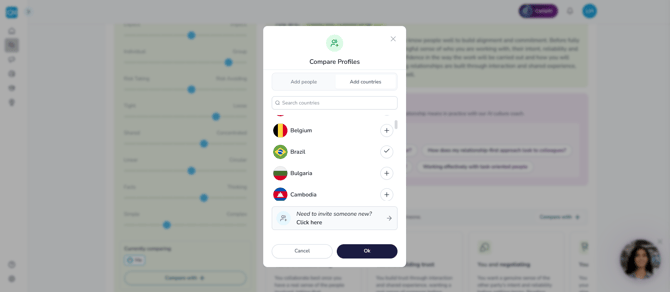
- Click Compare with, below your profile
- Choose the country you'd like to compare with
What you'll see
Once you've added a country, both profiles show together. Your position on each dimension sits alongside the country's, so you can compare them directly. The closer your positions are, the more aligned you're likely to be. The further apart they are, the more you may need to flex your approach.
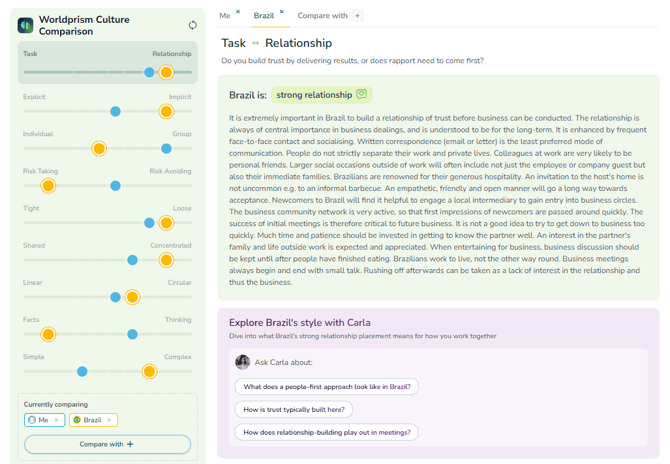
To find out more, click the country's tab beside yours to read its full profile, and what its position on each dimension means for working together.
You can also:
- Watch a short video on how to flex, on any dimension where you lean in opposite directions
- Ask Carla what the comparison means for you, and how to prepare for your next trip, meeting or project
Remember
A country profile shows general tendencies, not how every individual will think or work. It's a great starting point, but it's always worth getting to know the people you're working with too.
Is country the same as culture? →
Any questions? Email us at support@countrynavigator.com.