
You can control which learning paths your organization can see from the Admin page. Click your user icon in the top right corner, then Admin, and open the Learn Library page.
Switching paths on and off
Use the toggle next to each learning path:
- On: the path appears on everyone's Learn page, and you can assign it
- Off: the path is hidden, but can still be assigned to particular users or groups.
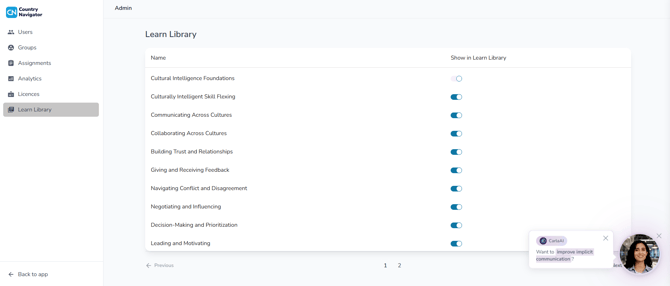
What's on to begin with
Our standard learning paths, including Cultural Intelligence Foundations and our CQ Skills paths, are switched on for everyone by default. So most of the time, you'll be switching off any paths you don't need.
Any extra paths your organization has added to its plan will appear in the list switched off, ready for you to turn on.
Can't find a path?
The list runs across several pages, so check the page numbers at the bottom.
Want your own learning path?
You can't upload your own content, but we can build a custom learning path for your organization.
What are custom learning paths? →
How do I assign a learning path? →
Any questions? Email us at support@countrynavigator.com.