
Analytics shows you how Country Navigator is being used across your organization, so you can track your rollout and back it up with real data. Click your user icon in the top right corner, then Admin, and open Analytics.
There are three tabs.
Organization
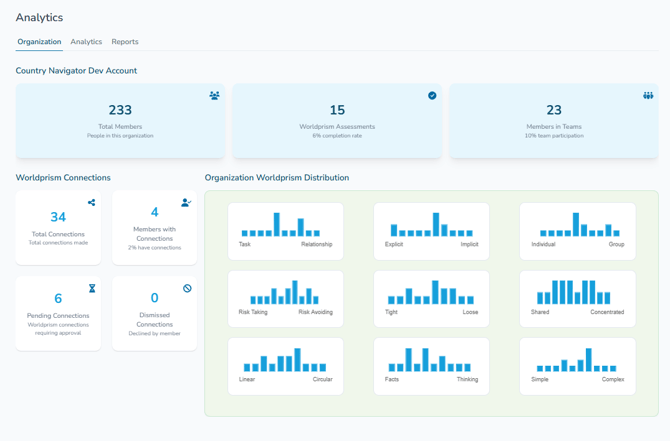
Your organization at a glance:
- Your people: how many members you have, how many have completed Worldprism™, and how many are in a team
- Worldprism™ connections: how many connections have been made, how many people have at least one, and how many requests are pending or declined
- Your organization's Worldprism™ distribution: how your people are spread across each of the 9 dimensions, so you can see your organization's cultural style. No names are shown
Analytics
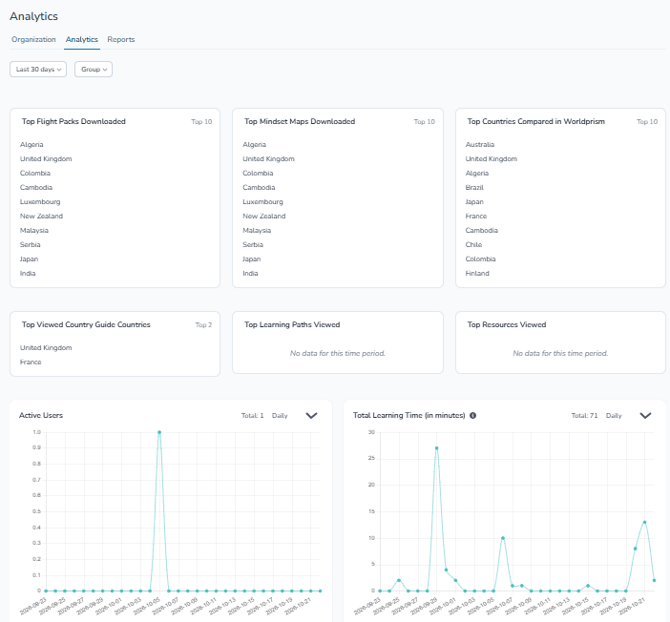
See how people are using the platform over time. Filter by date range and group, and switch each graph between daily, weekly and monthly views. You'll find:
- Most popular: the learning paths, Country Guides and Worldprism™ country comparisons your people use most
- Active users and learning time: how many people are using the platform, and how many minutes they've spent learning
- Learning: learning paths started and completed
- Connections and teams: Worldprism™ comparisons, connection invites sent and accepted, and teams created and joined
- Countries: Country Guide visits
- Live sessions and coaching: masterclass registrations and Carla chats
Reports
Download detailed data on your users, their activity, learning time, learning path progress and feedback, as Excel or CSV.
Tracking a specific learning path?
You'll find progress for each assignment on the Assignments page.
How do I track progress on an assigned learning path? →
Any questions? Email us at support@countrynavigator.com.