
Your learning history lives in My Learning Log. Click your user icon in the top right corner, then My Learning Log.
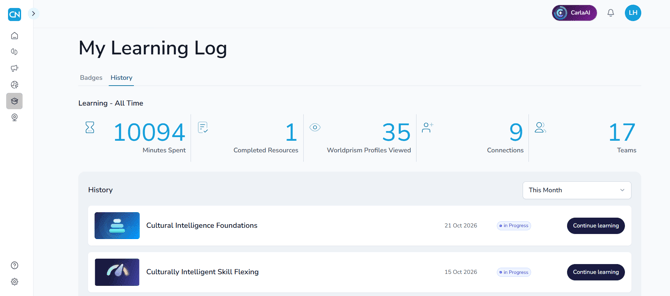
Your all-time summary
At the top of the page, you'll see:
- Minutes Spent: an estimate based on the steps you've completed and your activity on the platform
- Completed Resources: the learning paths you've finished
- Worldprism Profiles Viewed: how many different people's profiles you've looked at
- Connections and Teams: how many you have right now
Your history
Below the summary is a list of everything you've completed or started, with the date and its status. Use the filter above the list to change the time period.
Pick up where you left off
Click Continue learning next to anything you've started, to go straight back to it.
Who can see it?
No other user can see your Learning Log. If your organization has an admin, they can see your learning activity in their reports.
How do I find my assigned learning paths? →
Any questions? Email us at support@countrynavigator.com.