
My Team Coach brings your team's Worldprism™ profiles together into one shared team profile, so you can see your team's collective strengths and blind spots.
What you'll see
- Your team's profile: where your team sits on each of the 9 dimensions, shown alongside your own position
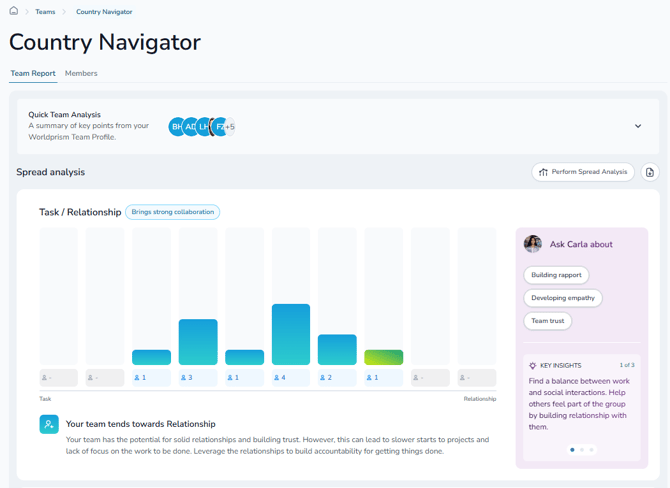
- How your team is spread: how many members sit at each point on a dimension, so you can see where you're aligned and where you differ
- A quick team analysis: a short summary of your team's style across every dimension
- Your team map: where your team is from, and the countries they've lived in and visited
Get coaching on your team
Carla can see your full team profile, so you can ask her about real situations, like:
- Running a team meeting where everyone gets heard
- Bringing a new team member up to speed
- Getting the team to agree on a tricky decision
- Giving feedback to the team in a way that lands
- Understanding why a project keeps stalling
Each time you come back, she can help you explore something new.
Use it together
My Team Coach works well as a shared starting point for a team discussion. At the end of the guided tour, you can download a Team Culture Report to share with your team.
Your results stay private
Your team profile never shows who sits where. It only shows team averages and how many people sit at each point, and the Team Culture Report doesn't name anyone either.
Getting started
Click My Team Coach in the side navigation panel. Not in a team yet? Try the Demo Team to see what it can show you.
Any questions? Email us at support@countrynavigator.com.